Outcomes
- Architecture — Replaced a five-application Windows stack tied together with SMB shares and an NDI streamer with a four-application Linux stack using HTTP and SFTP for data transport, removing the NDI streaming app and migrating the Windows Unity booth builds to WebGL deployed on the museum's existing Pixilab Blocks infrastructure.
- ComfyUI workflow — Redesigned the ComfyUI pipeline from an SD1.5 mask-driven paste-up into an SDXL + IPAdapter + InstantID identity-preserving pipeline that mixes selfie, text, and exhibit-object image prompts into coherent portraits.
- UX — Simplified the visitor journey to selfie + three exhibition elements, and added error handling so illegible selfies are flagged before reaching the pipeline.
At Nordiska Museet in Stockholm, the award-winning Nordbor exhibition closes with a finale: visitors take a selfie at one of several client stations, pick three elements from the exhibition that resonated with them, and a self-hosted diffusion pipeline blends selfie and selections into a unique portrait. The portraits appear in a magical-wood scene in the final room, projected alongside other visitors' images — a metaphor for how the history leaves traces in us all.
Challenge
The installation had run for a couple of years when the studio I work at was assigned to update its UX and system design, which consisted of:
- Photobooth applications handling selfie images and exhibition artefact selection, running on Windows PCs.
- Windows Server running ComfyUI.
- Stable Diffusion 1.5 used for background re-skinning rather than generation — the visitor's selfie was cut onto a stylized background and masked back in, leaving visible seams.
- Image transport over Windows SMB file shares: the AI PC polled the photobooth station network paths for new selfies, and a separate batch pipeline pushed finished portraits to the media server.
- NDI streamer: a dedicated Unity application loaded ComfyUI outputs onto a canvas and shipped them over NDI to Millumin on the media server, also handling per-portrait positions/scale/timers and OSC feedback sounds.
Artefact data was duplicated across photobooths and AI server, so updating the library meant changes on multiple nodes.
 The original photobooth inputs
 Output from the original SD1.5 masking workflow
The client's brief was more cohesive image generation, where selected artefacts from the exhibition blended with the visitor selfie — this was not doable with the existing workflow. Upgrading the output meant newer models and identity-preserving custom nodes (InstantID), and — since we were replacing system parts anyway — we decided to redo the least maintainable pieces of the architecture underneath.
Approach
I worked across three domains: the system architecture, the ComfyUI diffusion workflow, and the visitor UX.
System architecture
The AI server is now Linux to improve maintainability, and everything runs under systemd. Two main units — a comfyui service and a webserver service — auto-restart five seconds after any failure, expose structured logging via journalctl, and offer desktop shortcuts for staff to view logs and restart services.
A split up ad-hoc SMB file sharing (for selfie image) and WebSocket tunnel (prompt) between booths and AI PC were replaced with a small REST API — one transferring user selected data from photobooths to AI server. The Windows SMB image transport from the AI server to media server was replaced with SFTP, so finished portraits are written straight to the media server's SFTP server, and the bespoke NDI streaming Unity app was removed entirely; Millumin + a small Python script on the projection Mac handle image selection, layout, and OSC feedback cues directly off the SFTP-shared directory. Image data is no longer duplicated across clients and server — each selfie lives in exactly one place on its way through the pipeline.
The python webserver orchestrates the full round-trip: it receives the selfie and prompt images over REST, edits the version-controlled ComfyUI workflow JSON at its entry points (prompt text, three image inputs, seed, steps), submits to the local ComfyUI API, retrieves the finished portrait, and uploads it over SFTP to the media server. Generation and upload failures are retried; if a submission still can't produce a portrait, the error is surfaced in journalctl and the booth is told so the visitor can retake, rather than the portrait vanishing silently.
The standalone Unity booth clients + per-machine build setup were replaced with Unity WebGL deployments hosted as Pixilab Blocks spots — the same signage/orchestration platform already used widely across the exhibition — so a booth starts when its spot is turned on and gallery staff manage it from the same console they already know. Cross-node error handling between clients and the AI server now surfaces failures readably instead of hanging silently, so an operator can see what broke and restart just that piece.
Fewer moving parts, and more reusability across the system.
ComfyUI workflow redesign
The old workflow tried to paste the visitor back into a stylized scene — Realistic_Vision_V5.1 (SD1.5) plus rembg background removal, masquerade-nodes mask-by-text / cut-paste / color correction, and efficiency-nodes overlay. The diffusion model was mostly doing texture re-skinning, making photographs look like paintings, and the visitor's identity was pieced back in by masking the original selfie onto the stylized background — seams often visible and not utilizing the power of diffusion models to synthesize and mix inputs.
The new workflow runs on SDXL (JuggernautXL Ragnarok v9) with two complementary custom nodes:
- InstantID for facial recognition — preserves the visitor's identity across the stylized output.
- IPAdapter for style and composition transfer — carries the chosen "look" without manual masking.
The pipeline now mixes three image/text prompts with the visitor's selfie: the chosen landscape provides the style, the chosen historical figure provides the composition, and the chosen museum artefact appears interacting with the visitor on the final image — coherent portraits where the visitor is genuinely in the scene, with natural interaction with the exhibit objects rather than a paste-up.
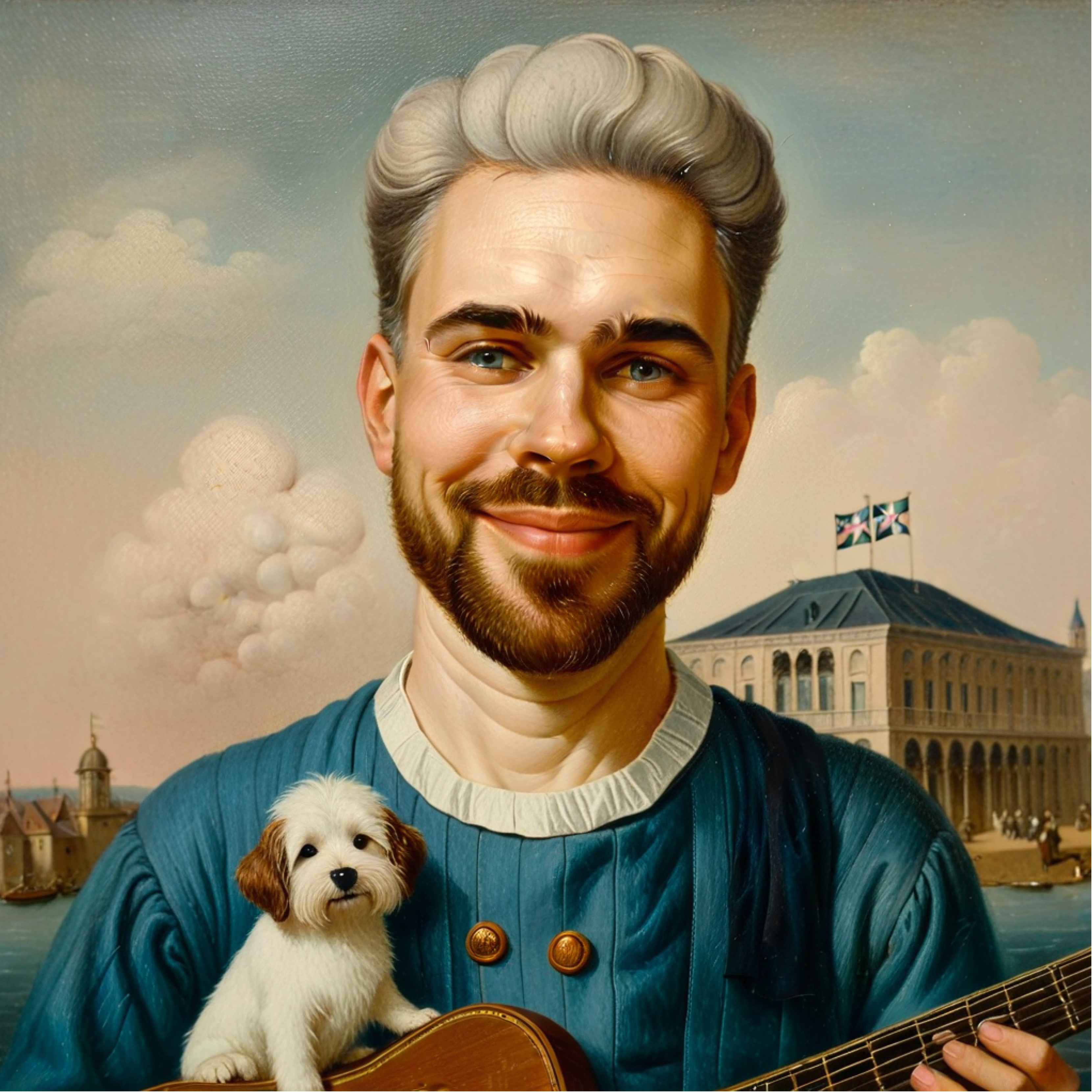 Output from the new SDXL + InstantID + IPAdapter pipeline
UX simplification
The original photobooth app UI walked the visitor through a series of six object selections + a selfie — more clicks than the finale merited, and more choices than the pipeline could meaningfully honor. I simplified the journey to a selfie plus three exhibition elements, each carrying a clear role in the final image:
- a landscape — sets the style of the portrait;
- a historical figure — sets the composition;
- a museum artefact — appears interacting with the visitor on the final image.
 The redesigned photobooth wizard
I also added error handling on the client: if the captured selfie isn't legible enough to trigger the ComfyUI workflow (bad lighting, face out of frame, blur), the visitor is told at the station and asked to retake, rather than the submission disappearing into a silent pipeline failure and a missing portrait in the finale room.